These Elden Ring save files cover four different situations: accessing the game’s endings, starting Shadow of the Erdtree with a prepared character, entering New Game+, or continuing from just before the Lord of Frenzied Flame ending.
Available Save Files
- All Endings – including Shadow of the Erdtree
- Pre-DLC Save – base-game items collected
- New Game+ Samurai – Level 225, Version 1.14
- Before Lord of Frenzied Flame Ending – Level 316, Version 1.16.1
1. Elden Ring – All Endings Save (Including DLC)
This save lets you access several ending scenes without replaying the whole game.
Shadow of the Erdtree ending: The character is just before the final cutscene. Interact with the golden sphere to continue.
Normal endings: Travel to the Fractured Marika Site of Grace and interact with Marika’s body to choose an available ending.
Age of the Stars: Use the blue summon sign on the ground in front of Marika.
Lord of Frenzied Flame: Travel to the Frenzied Flame Proscription Site of Grace, remove your armor, and interact with the door. After the cutscene, return to Fractured Marika and interact with Marika’s body.
2. Elden Ring – Pre-DLC Save (All Base-Game Items)
This save is for players who have lost their old progress and want to start the DLC without collecting the base-game items again. It comes with a Strength build and the obtainable items from before the DLC.
- Includes obtainable items from the base game before the DLC.
- Comes with a Strength build.
- Contains a large, cheated amount of runes.
Note: If you don’t want the extra runes, use a Memory of Grace to lose them.
3. Elden Ring – New Game+ Samurai Save
This level 225 Samurai save is prepared for the seventh journey. You can also spend the available runes to reach level 313.
- All weapons in triplicate; check the chest for extra +0 copies.
- Standard and alternative armor sets.
- Plenty of resources for the next playthrough.
Game version: 1.14
4. Elden Ring – Before Lord of Frenzied Flame Ending
The Elden Beast is already defeated, and the save is positioned before the Lord of Frenzied Flame ending.
- Character level 316.
- All flasks, legendary Ashes, talismans, and weapons.
- Five Larval Tears for reallocating attributes.
Game version: 1.16.1
How to Install Elden Ring Save Files
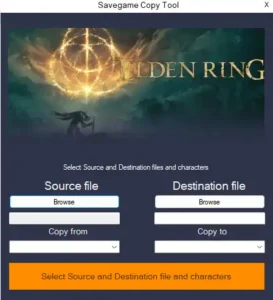
You can install the downloaded save using EldenRingSaveCopier. Follow these steps to replace a character without losing your other saves.
- Close Elden Ring.
- Download EldenRingSaveCopier from here or check their Github for latest version.
- Press Win + R, enter
%APPDATA%\EldenRing, and press Enter. - Open the numbered folder inside. This is where your original game save is stored. The file is usually named
ER0000.sl2. - Back up your original
ER0000.sl2file by copying it somewhere safe. - Open EldenRingSaveCopier. Select the downloaded save as the Source File and your original
ER0000.sl2as the Destination File. - Click Select source and destination file and character
- Complete the operation and launch the game.
What If the Save Doesn’t Load?
If you get the save error shown below, follow these steps:
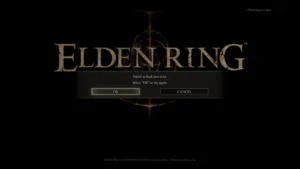
1. Back up your original save file, then delete the existing save files.
2. Launch Elden Ring, select New Game, and create a character.
3. Watch the cutscene and continue until you can control your character. The game will create a new save.
4. Close the game and use EldenRingSaveCopier, following the same steps explained above. Select the downloaded save as the source and your new save as the destination.
5. Launch the game and check if the save works.
Important: Do not delete your backup until you have confirmed that the transferred save works.